
Savings AI allows users to instantly generate an intelligent summary of any Savings Initiative, helping them quickly understand overall savings, identify opportunities and risks, and prioritise actions requiring attention.
By analysing information stored within the savings record, including milestones, projected and realised savings, suppliers, categories, ownership, departments, locations, currencies, approvals, and activity history, Savings AI generates an executive summary and highlights key actions that may require review.
This guide explains how to generate a Savings AI summary and interpret the results.
When to Use This Feature
✅ Before Savings review meetings.
✅ When preparing management reports.
✅ When reviewing milestone progress.
✅ When monitoring realised savings against projections.
✅ When onboarding new savings owners or managers.
✅ When identifying savings initiatives requiring attention.
✅ When preparing quarterly or annual savings reports.
Step-by-Step Guide
1. Open a Savings Record
Navigate to the savings initiative you want to review.
Navigate to Savings Management.
Open the required Savings Initiative.
Review the savings dashboard.
The savings record displays key information including projected and realised savings, milestones, suppliers, categories, ownership, approvals, currencies, locations, departments, and supporting documentation.
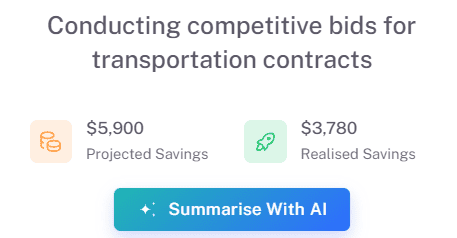
2. Generate an AI Summary
Savings AI can be launched directly from the savings record.
Click Summarise with AI.
Wait while the analysis is generated.
The system will create a comprehensive summary of the savings initiative.
Savings AI analyses all available information and presents the most important insights in a
3. Review Immediate Actions Required
At the top of the summary, Savings AI highlights activities that may require immediate attention.
Examples include:
Overdue milestones.
Milestones approaching their due date.
Savings awaiting approval.
Variances between projected and realised savings.
Missing milestone information.
Savings initiatives with limited progress.
Outstanding approvals.
Missing ownership or management assignments.
These items are prioritised to help you focus on the most important actions first.
4. Review the Executive Summary
The Executive Summary provides a concise overview of the savings initiative.
This may include:
Overall objective of the initiative.
Current progress.
Projected savings.
Realised savings.
Key suppliers involved.
Current milestone status.
Business impact.
Risks or opportunities.
Important upcoming activities.
The summary is designed to provide a complete overview in seconds without reviewing multiple tabs within the savings record
5. Review Savings Metrics
Savings AI presents a high-level view of the most important performance indicators.
These may include:
Initiative Status
Total Projected Savings
Total Realised Savings
Number of Milestones
Milestone Progress
Savings Type
Currency
Key Dates
Approval Status
These metrics help users quickly assess the health and performance of the initiative.
6. Review Summary of Priorities
The Summary of Priorities consolidates the most important recommendations generated by Savings AI.
Examples include:
Review overdue milestones.
Complete pending milestone approvals.
Investigate projected versus realised savings variances.
Update missing milestone information.
Validate ownership and accountability.
Review upcoming milestone deadlines.
Monitor supplier performance impacting savings delivery.
Users can then navigate directly to the relevant section of the savings record to take action.
Key Considerations & Best Practices
Savings AI summaries are generated using information stored within the contract record.
Keep savings initiatives and milestones up to date to monitor delivery.
Review Immediate Actions Required regularly.
Use Savings AI before stakeholder meetings and performance reviews.
Regularly compare the projected and realised savings to monitor delivery
Use the AU summary as a starting point for analysis and decision making.
AI-generated recommendations are designed to support, not replace, business judgement.
Savings AI summaries are generated using the information stored within the savings record.
Additional Resources
If you need further assistance, please contact your internal platform administrator for support. Otherwise please reach out to oboloo's support team. If you are unable to view the above area in the oboloo platform, please check your user permissions and access rights.