
Sourcing AI allows users to instantly generate an intelligent summary of any sourcing activity, helping them quickly understand progress, identify risks, and prioritise actions requiring attention.
By analysing information stored within the sourcing activity, including event details, suppliers, questionnaires, scoring, responses, timelines, messages, attachments, evaluation progress, and award status, Sourcing AI generates an executive summary and highlights key actions that may require review.
This guide explains how to generate a Sourcing AI summary and interpret the results.
When to Use This Feature
✅ Before supplier evaluation meetings.
✅ When preparing sourcing status updates.
✅ When reviewing supplier responses.
✅ When monitoring sourcing deadlines..
✅ When onboarding new sourcing managers.
✅ When preparing award recommendations.
✅ When identifying sourcing activities requiring attention.
Step-by-Step Guide
1. Open a Sourcing Record
Navigate to the sourcing activity you want to review.
Navigate to Sourcing.
Open the required sourcing activity.
Review the sourcing dashboard.
2. Generate an AI Summary
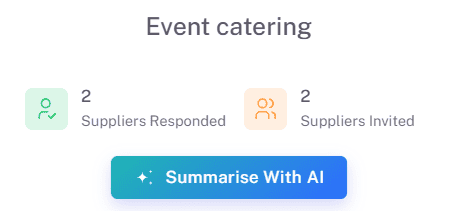
Sourcing AI can be launched directly from the sourcing activity.
Click Summarise with AI.
Wait while the analysis is generated.
The system will create a comprehensive summary of the sourcing activity.
Sourcing AI analyses all available information and presents the most important findings in a structured, easy-to-read format.
3. Review Immediate Actions Required
At the top of the summary, Sourcing AI highlights activities that may require immediate attention.
Examples include:
Supplier responses still outstanding.
Evaluation scoring not yet completed.
Upcoming sourcing deadlines.
Questionnaires awaiting review.
Missing supplier submissions.
Award decisions pending.
Evaluation bottlenecks.
Inactive suppliers requiring follow-up.
These actions are prioritised to help you focus on the most important sourcing activities first.
4. Review the Executive Summary
The Executive Summary provides a concise overview of the sourcing activity.
This may include:
Purpose of the sourcing activity.
Current sourcing stage.
Number of invited suppliers.
Supplier response progress.
Evaluation status.
Scoring progress.
Key risks.
Important upcoming deadlines.
Overall sourcing health.
The summary is designed to provide a complete overview in seconds without reviewing multiple tabs within the sourcing activity.
5. Review Savings Metrics
Sourcing AI presents a high-level view of the most important sourcing indicators.
These may include:
Activity Status
Event Type
Supplier Participation
Response Rate
Evaluation Progress
Award Status
Key Dates
Questionnaire Completion
Overall Progress
These metrics help users quickly assess the status and health of the sourcing activity.
6. Review Summary of Priorities
The Summary of Priorities consolidates the most important recommendations generated by Sourcing AI.
Examples include:
Follow up with suppliers who have not responded.
Complete outstanding evaluations.
Review submitted questionnaires.
Prepare supplier award recommendations.
Monitor upcoming deadlines.
Resolve evaluation delays.
Finalise sourcing decisions.
Users can then navigate directly to the relevant area within the sourcing activity to take action.
Key Considerations & Best Practices
Sourcing AI summaries are generated using information stored within the sourcing activity.
Ensure sourcing activities remain up to date for the most accurate results.
Review Immediate Actions Required regularly throughout the sourcing lifecycle
Use Sourcing AI before evaluation meetings and supplier review sessions.
Monitor supplier response rates and evaluation progress to avoid delays.
Use the AI summary as a starting point for sourcing decisions and stakeholder discussions.
AI-generated recommendations are designed to support, not replace, professional judgement.
Additional Resources
If you need further assistance, please contact your internal platform administrator for support. Otherwise please reach out to oboloo's support team. If you are unable to view the above area in the oboloo platform, please check your user permissions and access rights.