
The Free Forever Plan gives your organisation free, unlimited use of all four oboloo modules: Supplier Management, Contract Management, Savings Management and Sourcing. Each module also has a Plus plan that adds extra features, and you can upgrade any module on its own from Settings > Account Management.
This page summarises what the free plan covers. For a feature-by-feature comparison with the Plus plans, see What's Included on the Free Plan and Plus Plans.
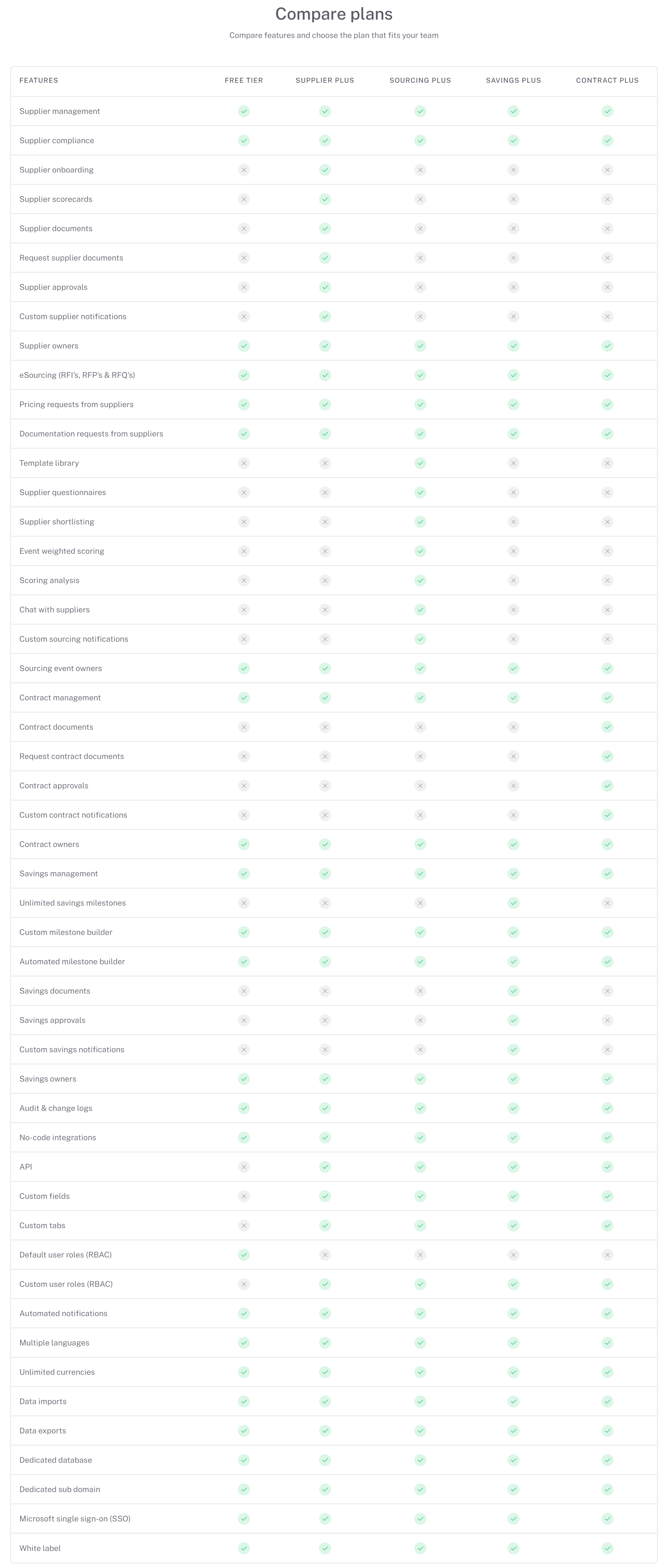
What's included in each module
Supplier Management
Create unlimited supplier records, or upload existing ones with a CSV import.
Start with the essential details and add more whenever you choose, using fields based on procurement best practice and your own dropdown values.
Link suppliers to contracts, savings and sourcing activities, assign supplier owners and use the Supplier Compliance page.
Add the supplier's website and oboloo fetches its logo automatically.

Contract Management
Create unlimited contract records, or upload existing ones with a CSV import.
Link contracts to suppliers, savings and sourcing activities, and assign contract owners.
Receive automatic notifications before contract end dates and notice periods.

Savings Management
Create unlimited savings initiatives and assign savings owners.
Track one milestone per savings initiative, with automatic milestone notifications. Savings Plus gives you unlimited milestones.

Sourcing
Create unlimited sourcing activities (RFIs, RFPs and RFQs) and send them to suppliers in oboloo.
Request pricing and documents, share supporting documents, and get notified when suppliers respond.
View each supplier's response, pricing and uploaded documents. Weighted scoring, scoring analysis, supplier questionnaires and supplier chat need Sourcing Plus.
Across all modules
Automated notifications, CSV imports and exports, multiple languages, unlimited currencies, Microsoft single sign-on (SSO), default user roles and no-code integrations.
A change log on every record. Opening an entry to see exactly what changed needs a Plus plan.
No licences are needed: there's no limit on the number of users on the free plan.
Your 14-day Plus trial
Every new oboloo account starts with a 14-day trial of the Plus features in all four modules. A banner at the top of oboloo shows the days left. When the trial ends, your account moves to the Free Forever Plan automatically and your data is kept.
What you can do from here
To… | Do this | Guide |
See exactly which features need Plus | Check the comparison tables | |
Find out what each Plus plan adds | Read the Plus overview | |
Upgrade one or more modules | Go to Settings > Account Management | |
Give or remove a colleague's access | Activate or deactivate the user |
Common questions
I see an 'Upgrade to … Plus' window. What does it mean?
The feature you tried to use needs that module's Plus plan. Click Request a 14-day free trial to ask the oboloo team for a trial (they'll get in touch; it doesn't start straight away), or Upgrade now to open the upgrade page.
Is the free plan really free forever?
Yes. There's no time limit and no user limit. You only pay if you choose to upgrade a module to Plus.
Can I upgrade just one module?
Yes. You buy Plus for each module separately, and the other modules stay on the free plan. See Plus Plans.
Related articles
If you need further assistance, please contact your internal platform administrator for support. Otherwise please reach out to oboloo's support team. If you are unable to view the above area in the oboloo platform, please check your user permissions and access rights.