
The My Records tab provides a single view of every record that has been assigned to you across oboloo. It allows you to quickly access the records you own or manage without having to navigate between individual modules.
📌 Tip: The My Records tab is available under your User Profile
The My Records tab displays records from the following modules:
Suppliers
Contracts
Sourcing Activities
Savings
Only records where you are assigned as either the Record Owner or Record Manager are displayed. Records that are not assigned to you are excluded from the list.
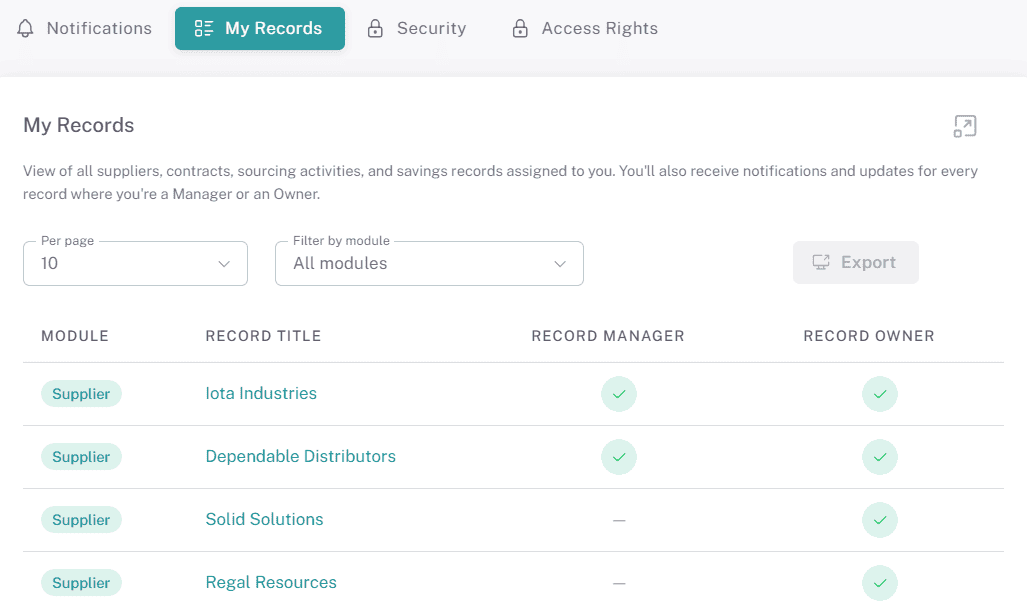
You'll receive notifications and updates for every record where you are assigned as either the Record Manager or Record Owner, helping you stay informed of any activity that requires your attention.
📌 Tip: Use the My Records tab as your personal workspace to quickly find and access all records you're responsible for.
📌 Need Further Help?
If you need further assistance, please contact your internal platform administrator for support. Otherwise please reach out to oboloo's support team. If you are unable to view the above area in the oboloo platform, please check your user permissions and access rights.
If you need further assistance, please contact your internal platform administrator for support. Otherwise please reach out to oboloo's support team. If you are unable to view the above area in the oboloo platform, please check your user permissions and access rights.