
Contract AI allows users to instantly generate an intelligent summary of any contract record, helping them quickly understand contract status, identify risks, and prioritise actions requiring attention.
By analysing contract information including contract terms, key dates, notice periods, documents, renewal settings, ownership, supplier information, and contract activity, Contract AI creates an executive summary and highlights immediate actions that may require review.
This guide will walk you through how to generate a Contract AI summary and interpret the results.
When to Use This Feature
✅ Before contract review meetings.
✅ When preparing for contract renewals.
✅ When reviewing upcoming notice periods.
✅ When assessing contractual risk and obligations.
✅ When onboarding new contract owners.
✅ When quickly understanding the overall status of a contract.
Step-by-Step Guide
1. Open a Contract Record
Navigate to the contract you wish to review.
Navigate to Contract Management.
Open the required contract record.
Review the contract dashboard.
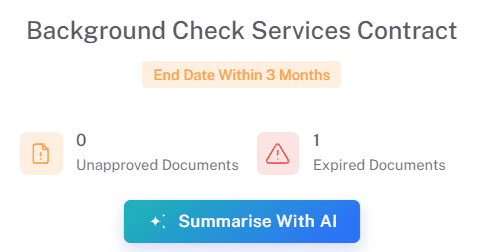
The contract record displays key information including contract status, supplier details, contract value, key dates, notice periods, renewal information, ownership, and associated documents.
2. Generate an AI Summary
Contract AI can be launched directly from the contract dashboard.
Click the Summarise With AI button.
Wait for the analysis to complete.
The system will generate a comprehensive contract summary.
Contract AI reviews all available contract information and presents the most important findings in a structured format.
3. Review Immediate Actions Required
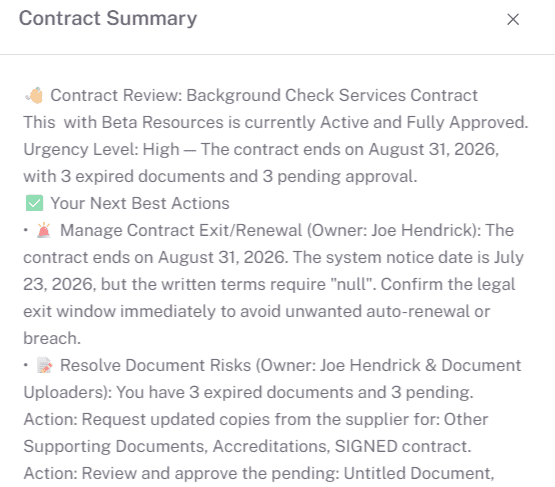
At the top of the summary, Contract AI highlights urgent items that require attention.
Examples may include:
Upcoming contract notice periods.
Contracts approaching expiry.
Missing or expired contract documents.
Auto-renewal risks.
Outstanding contract obligations.
Missing contract owner assignments.
Upcoming review dates or milestones.
These actions are prioritised to help users focus on the most important contract-related activities first.
4. Review the Executive Summary
The Executive Summary provides a concise overview of the contract.
This may include:
Contract purpose and scope.
Contract status.
Supplier information.
Contract value.
Renewal arrangements.
Notice period requirements.
Key contractual risks.
Important upcoming activities.
The summary is designed to give users a complete contract overview in seconds without manually reviewing multiple sections of the contract record.
5. Review Contract Metrics
Contract AI provides a high-level view of key contract indicators including:
Contract Status.
Contract Value.
Contract Term.
Renewal Status.
Notice Period.
Contract Risk Level.
Key Dates and Milestones.
These metrics help users quickly assess the overall health and status of the contract.
6. Review Summary of Priorities
The Summary of Priorities section consolidates important actions and recommendations identified by Contract AI.
Examples may include:
Review upcoming notice periods.
Prepare for contract renewal discussions.
Validate contract ownership.
Review expiring contract documents.
Assess contract performance and value.
Complete contract compliance activities.
Users can then navigate directly to the relevant area within the contract record to take action.
Key Considerations & Best Practices
Contract AI summaries are generated using information stored within the contract record.
Ensure contract records are kept up to date for the most accurate results.
Review Immediate Actions Required regularly.
Use Contract AI before renewal, review, and supplier governance meetings.
Monitor upcoming notice periods to avoid unintended renewals.
Use the summary as a starting point for contract management activities.
AI-generated recommendations should support, not replace, business judgement.
Additional Resources
If you need further assistance, please contact your internal platform administrator for support. Otherwise please reach out to oboloo's support team. If you are unable to view the above area in the oboloo platform, please check your user permissions and access rights.