
The Assigned Records tab provides administrators with a complete view of every record assigned to a specific user. It allows you to quickly see which records a user owns or manages across all core oboloo modules from a single location.
📌 Tip: The Assigned Records tab is accessed under Settings > Users and selecting a specific user
Only users with the appropriate access can add and manage users within oboloo. To find out more about user access rights, please check out this user guide here.
The Assigned Records tab displays records from the following modules:
Suppliers
Contracts
Sourcing Activities
Savings
Only records where the selected user is assigned as either the Record Owner or Record Manager are displayed. Records that are not assigned to the user are excluded from the list.
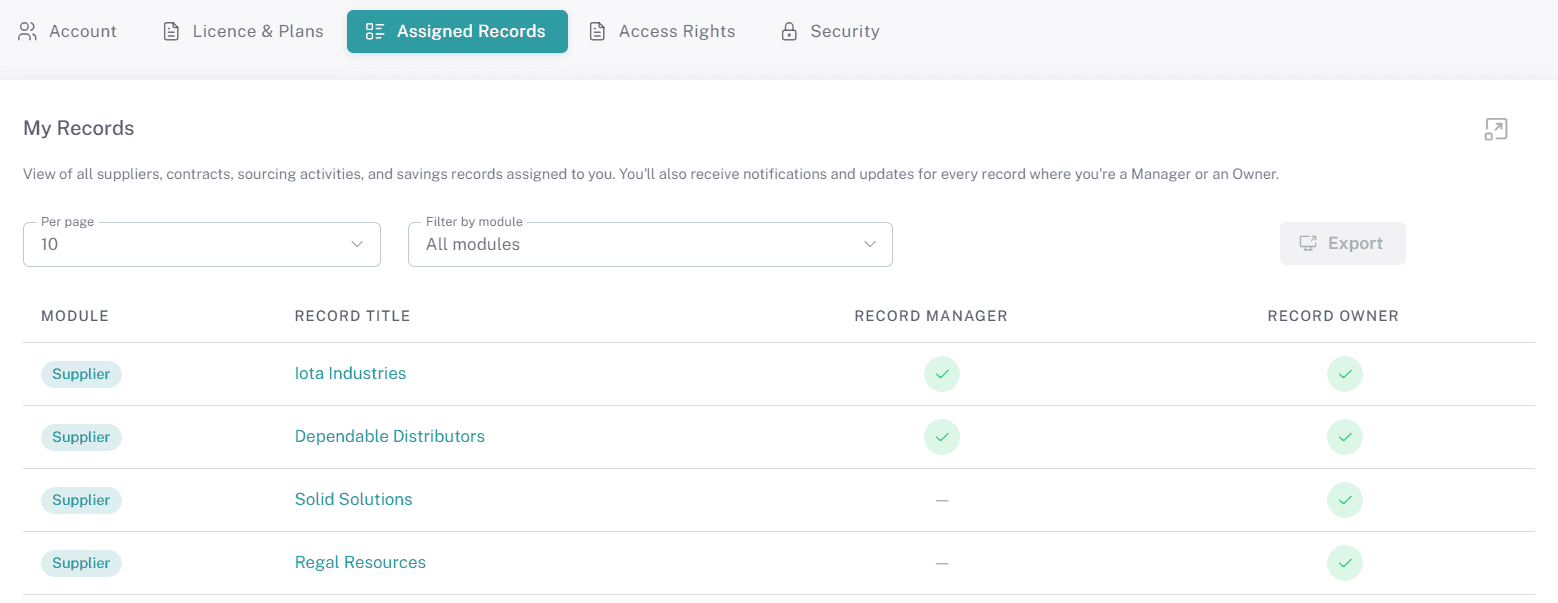
The Assigned Records tab makes it easy for administrators to review a user's responsibilities, verify record ownership, and identify all records managed by a particular user from one central location.
📌 Tip: Use the Assigned Records tab to quickly understand a user's responsibilities before changing permissions, reassigning records, or deactivating a user account.
📌 Need Further Help?
If you need further assistance, please contact your internal platform administrator for support. Otherwise please reach out to oboloo's support team. If you are unable to view the above area in the oboloo platform, please check your user permissions and access rights.
If you need further assistance, please contact your internal platform administrator for support. Otherwise please reach out to oboloo's support team. If you are unable to view the above area in the oboloo platform, please check your user permissions and access rights.