
Milestones are key checkpoints within a savings record that help track progress toward projected cost reductions, cost avoidance, and overall financial performance.
These milestones allow organizations to monitor savings initiatives over time, ensuring that expected benefits are realized and properly documented.
This guide will walk you through the process of reviewing, editing, and marking milestones as complete within a savings record.
When to Use This Feature
When tracking financial progress within a savings record and ensuring milestones align with projected cost reductions.
When adjustments need to be made to milestone details such as dates, baseline spend, projected savings, or cost avoidance and realised savings.
When a milestone has been achieved and needs to be marked as complete to reflect realized savings.
When comparing pipeline, projected, and realized savings to analyze cost-saving performance.
When ensuring accurate financial reporting and maintaining a structured savings tracking system.
Step-by-Step Guide
1. Accessing the Savings Record
Navigate to the Main Menu and click on Savings Management.
Locate the savings record you want to update using the search bar or filters.
Click on the savings record to open its details page.
Go to the Milestones tab to view all existing milestones.
2. Editing a Milestone
In the Milestones tab, locate the milestone you need to update.
Click on the milestone to open its details.
Edit key fields such as:
Milestone dates
Baseline spend
Projected cost reduction
Cost avoidance
Realized Savings
Save the changes to update the milestone.
3. Marking a Milestone as Complete
Once a milestone is achieved, it should be marked as complete.
In the Milestones tab, find the milestone you want to finalize.
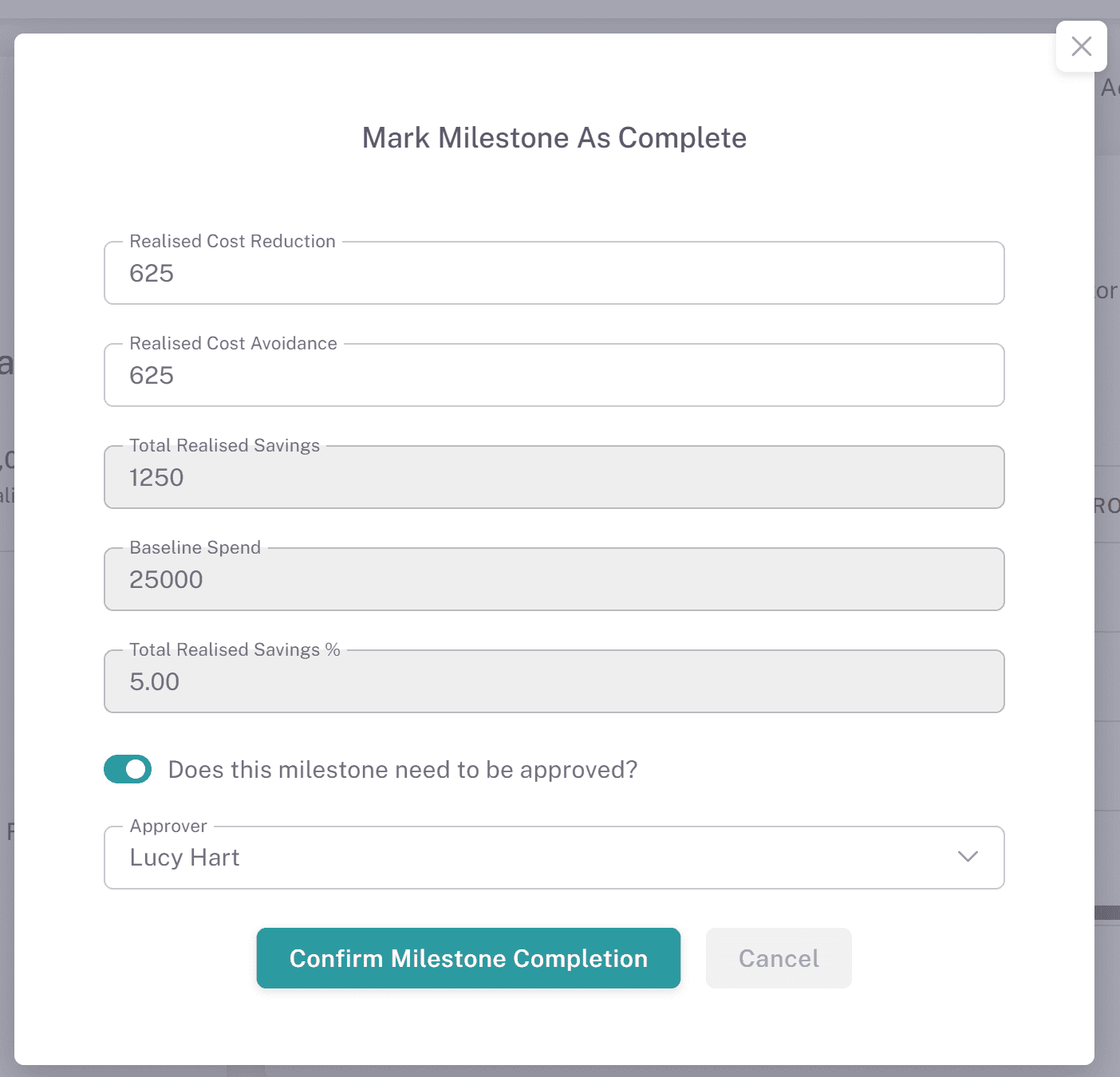
Click Mark as Complete to open a pop-up window.
If needed, adjust the realized savings before finalizing.
Click Confirm Milestone Completion to complete the milestone.
4. Tracking Milestones & Visual Analysis
As milestones are completed, the platform automatically updates the visual analysis dashboards.
The analysis will display the difference between:
Milestones Overview – How milestones work within savings records.
Savings Calculations - How are savings calculated
Milestone Approvals
Milestone approvals allow you to require approval when marking individual savings milestones as complete, ensuring savings are validated before being realised.
Where to Find This:
Navigate to Savings, open a savings record, and select the Milestones tab.Requiring Approval on a Milestone:
When marking a milestone as complete, you can choose to require approval.
Select Does this milestone need to be approved?
Choose an approver from the dropdown.
Confirm the milestone completion.
The milestone status will update to Pending Approval.
Approving or Rejecting a Milestone:
The selected approver will receive a notification.
Within the Milestones tab, the approver can use the Actions menu to review the milestone.
Selecting this option opens a confirmation modal where they can:
Approve Milestone
Reject Milestone
Approval Outcomes:
Approved:
Status changes to Completed
The milestone contributes to realised savings totals
Rejected:
A rejection reason is required
Status changes to Rejected
The milestone can be updated and submitted again for approval
Financial Impact:
Milestones with a status of Pending Approval or Rejected are not included in realised savings totals.
These remain within projected savings until approved.
Approval Tracking:
All approval decisions are recorded in the Approval Log, including whether the approval relates to a savings record or a milestone.
Milestone Table Information:
The Milestones table includes fields such as:
Approved By
Approved Date
These fields can be enabled using the Edit Columns option for additional visibility.
Why This Matters:
Requiring approval at milestone level provides greater control over savings validation, ensuring only verified savings are recognised and reported.
Key Considerations & Best Practices
✅ Regularly update milestones – Keeping milestones accurate ensures financial projections remain reliable.
✅ Use visual analysis for tracking progress – Reviewing projected vs. realized savings helps measure success and improve savings strategies.
✅ Set clear expectations for savings realization – Ensure milestones align with the organization's financial goals and cost-saving strategies.
✅ Monitor savings trends over time – Use milestone tracking to assess the effectiveness of cost-reduction initiatives.
Additional Resources
📌 Related User Guides:
Adding Savings Records – Best practices for maintaining and updating savings records.
If you need further assistance, please contact your internal platform administrator for support. Otherwise please reach out to oboloo's support team. If you are unable to view the above area in the oboloo platform, please check your user permissions and access rights.