
Plus plans add extra features to the oboloo modules on top of the Free Forever Plan. There's one Plus plan per module (Supplier Plus, Contract Plus, Savings Plus and Sourcing Plus), and you can upgrade any combination from Settings > Account Management.
This page summarises what each plan adds. For a feature-by-feature comparison, see What's Included on the Free Plan and Plus Plans.
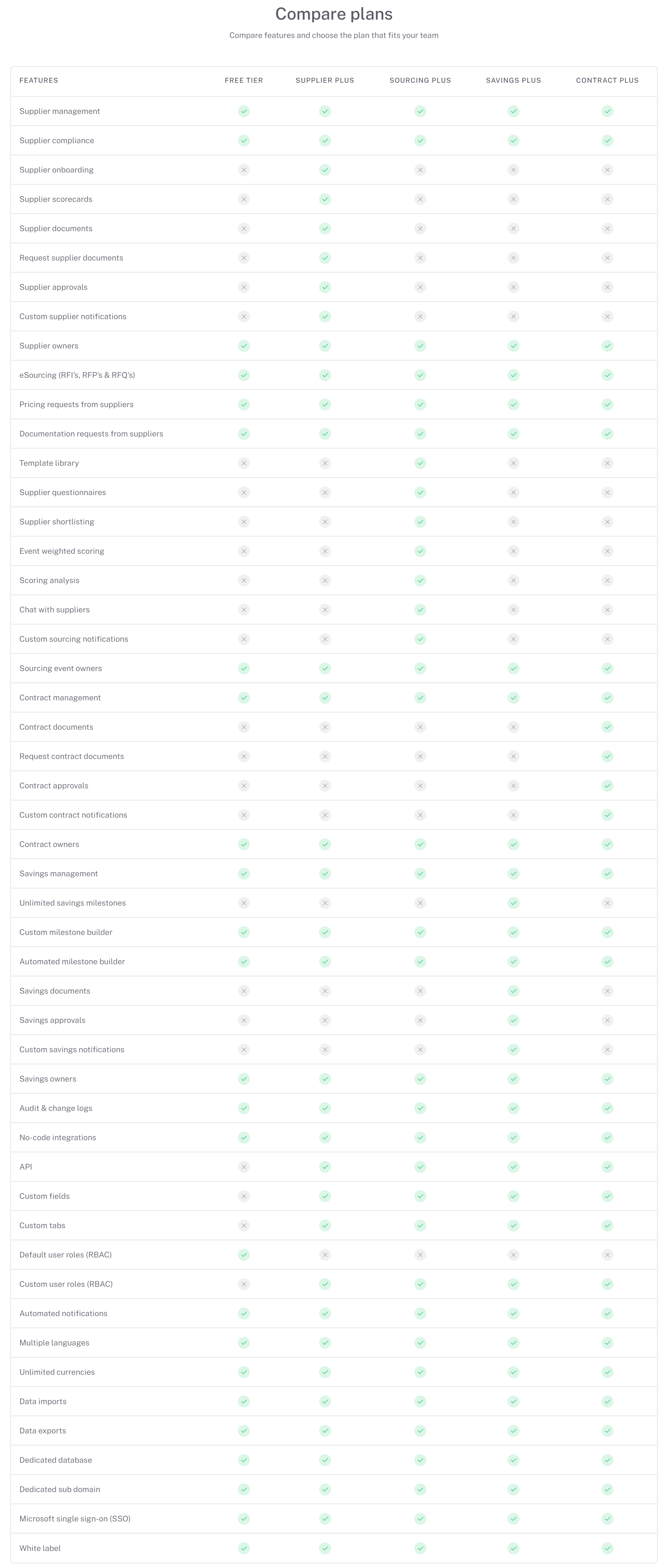
What each Plus plan adds
Supplier Plus
Supplier AI summaries of each supplier's status, risks, performance, compliance and actions needed.
Supplier onboarding, including packages of document and scorecard requests to send to suppliers.
Supplier scorecards that you complete internally or send to suppliers, with trends over time.
Supplier documents: upload them yourself or request and approve them from suppliers, with expiry notifications.
Supplier approvals and custom supplier notifications.
Contract Plus
Contract AI summaries of each contract's status, compliance and actions needed.
Contract documents: upload them yourself or request and approve them from suppliers.
Contract approvals when creating or editing a contract, and custom contract notifications.
Savings Plus
Unlimited milestones per savings initiative (the free plan allows one).
Savings documents, savings approvals, savings AI summaries and custom savings notifications.
Sourcing Plus
Internal and supplier sourcing sections and supplier questionnaires, with a library of default and custom templates you can clone.
Weighted scoring, scoring assignments for colleagues, scoring analysis and supplier shortlisting.
Chat with suppliers through announcements to all suppliers or private conversations.
Reopen activities for further rounds, inviting only the suppliers you choose.
Sourcing AI summaries and custom sourcing notifications.
With any Plus plan
Unlimited custom fields and custom tabs.
Custom user roles with granular permissions.
Access to the oboloo API.
Change log detail: open any change log entry to see exactly what changed.
Activity logging (notes, emails, calls, meetings, tasks and documents) on records in the modules you've upgraded.
How Plus pricing works
You buy Plus for each module separately, and the other modules stay on the free plan. Each user who works in oboloo needs a licence, and your licences are shared across all the Plus modules you've bought. You can pay monthly or annually (annual billing saves 17%). Current prices are shown on the upgrade page.
What you can do from here
To… | Do this | Guide |
Compare free and Plus features in detail | Check the comparison tables | |
Buy Plus for a module | Go to Settings > Account Management | |
Add or remove Plus modules | Change your subscription | |
Give users access | Assign licences |
Common questions
Do I need Plus for every module?
No. Upgrade only the modules where you need the extra features. Custom fields, custom tabs, custom roles and the API are unlocked by any Plus plan.
Do I need a licence for each module?
No. A user's licence covers every Plus module on your subscription. See Increasing or Decreasing License Quantities.
What happens when my trial ends?
Your account moves to the Free Forever Plan automatically and your data is kept. Plus features show an upgrade prompt again until you buy the modules you need.
Related articles
If you need further assistance, please contact your internal platform administrator for support. Otherwise please reach out to oboloo's support team. If you are unable to view the above area in the oboloo platform, please check your user permissions and access rights.