
The Milestone Reporting page lists every savings milestone across your organisation in one table, so you can report on milestone progress and projected and realised savings without opening each savings initiative. Go to Savings Management > Milestone Reporting.
Before you start
What's on the page
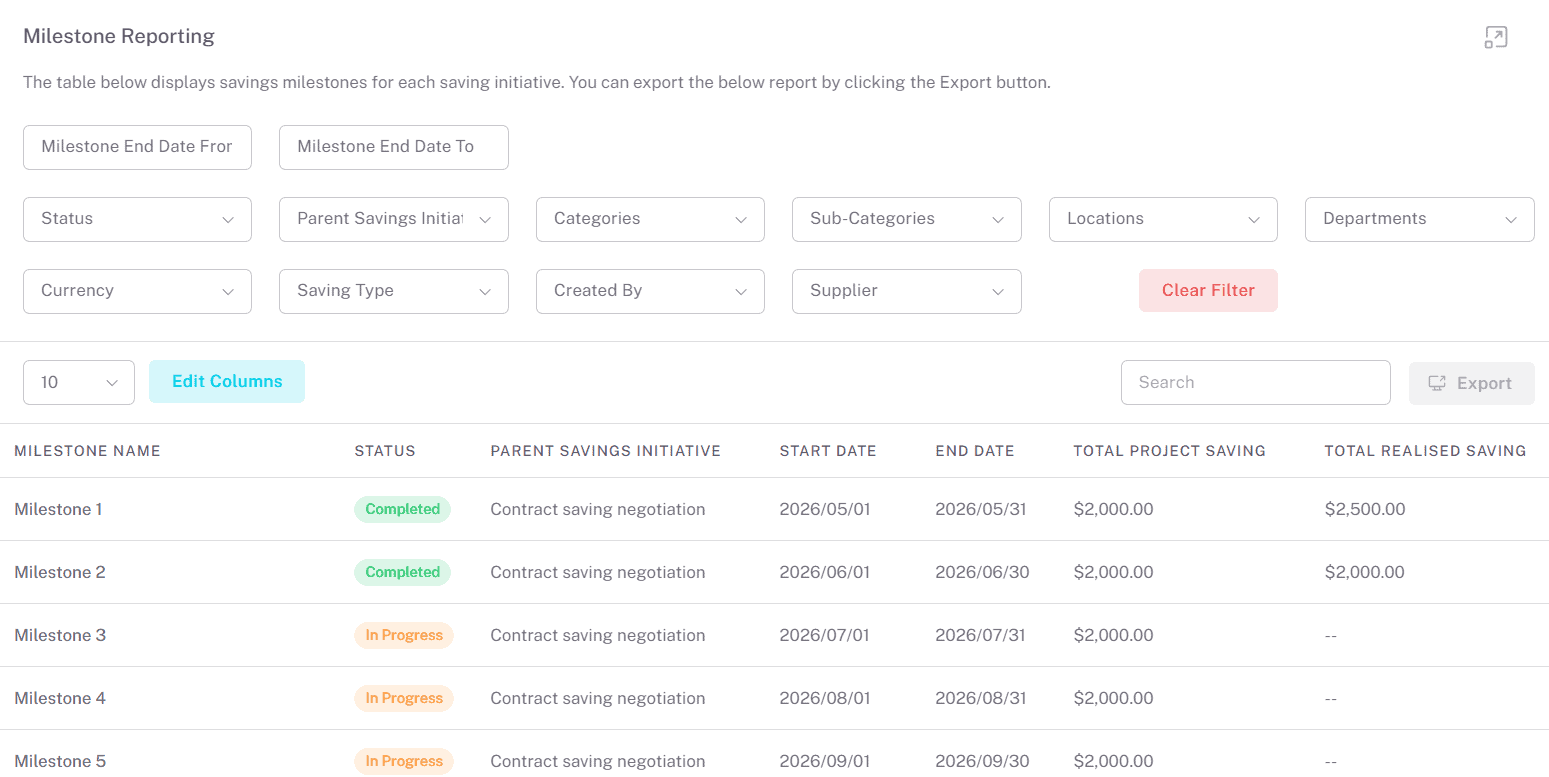
Area | What it shows |
Filters | Milestone End Date From and To, Status, Parent Savings Initiative, Categories, Sub-Categories, Locations, Departments, Currency, Saving Type, Created By, Supplier and Archive Status. Clear Filter resets them. |
Milestones table | By default: Parent Savings Initiative, Milestone Name, Status, Start Date, End Date, Baseline Spend, Total Projected Savings and Total Realised Savings. Amounts are in each saving's own currency. |
Edit Columns | Adds or removes columns, such as Currency, the cost reduction and avoidance columns, Approved By and Approved Date. |
Search and Export | Search the table, or download it as a CSV file. |
Actions menu (⋮) | View opens the milestone's parent savings initiative. |
Filter the report
Combine filters to answer a question, for example set Milestone End Date From and To to this quarter and Status to In Progress to see milestones due soon that aren't complete. Status offers In Progress, Completed and Cancelled; Archive Status offers Active and Archived.
Choose your columns
Click Edit Columns and tick the columns you want. Your choice also controls which columns are exported.
Export milestones
Choose your columns
Set the columns you want with Edit Columns.
Click Export
savings-milestones.csv downloads with your visible columns. Filters and search aren't applied to the export: it includes every milestone you can see, so filter the file in your spreadsheet if you need to.
What you can do from here
To… | Do this | Guide |
Update or complete a milestone | View to open the saving, then its Milestones tab | |
Approve a milestone | Open the saving's Milestones tab > Approve/Reject | |
Report on savings initiatives as a whole | Savings Management > Savings Initiatives | |
Export savings initiatives | Export on Savings Initiatives |
Common questions
My export has more rows than I see on screen
Exports always include every milestone you can see. Filters and search only change what's shown on screen.
Why can't I see which milestones are pending approval?
This page doesn't show Pending Approval or Rejected. Check the Milestones tab on the savings initiative. See Approve Savings Milestones.
A milestone I expect is missing
Check Clear Filter and Archive Status. If the savings initiative is set to Only owners can view and edit, only its owners and administrators can see its milestones.
Related articles
If you need further assistance, please contact your internal platform administrator for support. Otherwise please reach out to oboloo's support team. If you are unable to view the above area in the oboloo platform, please check your user permissions and access rights.